Give it a picture you like
A screenshot, a photo, an image from a mood board. The AI measures spacing, proportion and rhythm and rebuilds the look with the tools.

Make this pattern on a 300 × 300 mm panel.

Done: 53 cells on a 300 × 300 mm panel, every parameter still editable.
Or just spell out the numbers
No picture needed. Give it the panel size, the hole range, which way the gradient runs, the open area you are after and the corner radius it has to respect. The AI picks the arrangement, hits the numbers and shows you the result before anything is exported.
Speaker panel 120 × 80 mm, corner radius 12. Round holes, biggest in the middle and fading toward the edge, 4 mm max. Open area around 18%.
Hexagonal grid, 307 holes, 1.5–4.0 mm, radial gradient from the centre, clipped to the R12 corners.
Not sure yet? Show it the product
Send a photo and say which face needs the holes. The AI works up a few directions and drops each one back onto your photo, so you can judge the look on the real object before committing. Pick one and it hands over the editable design.
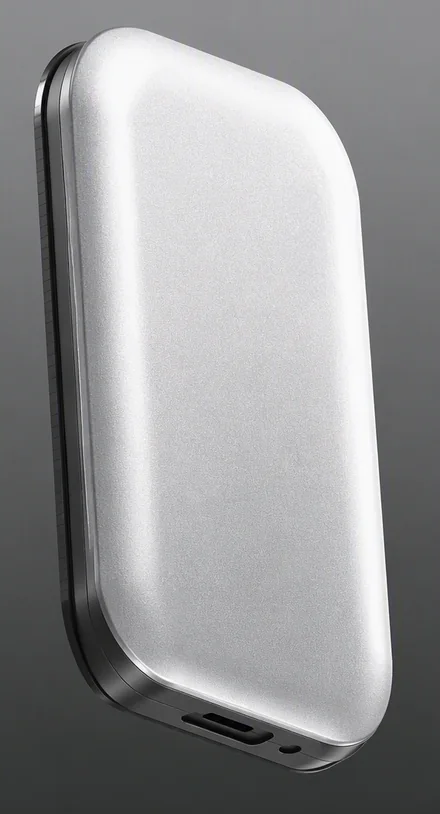
This is my product housing. The front face needs vents, show me three directions.
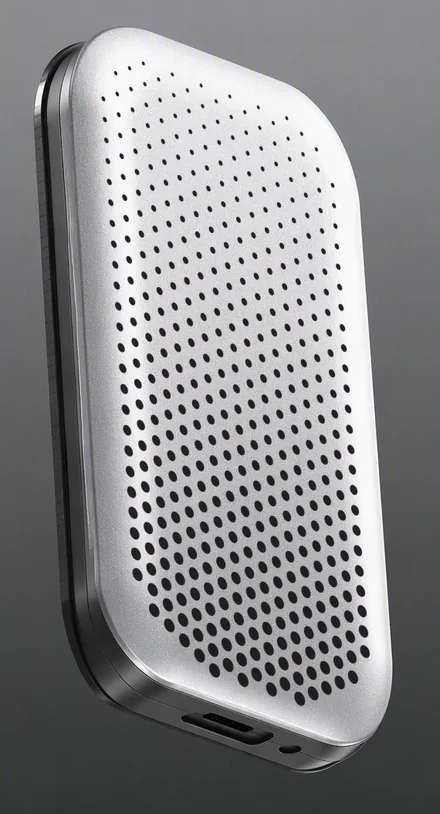
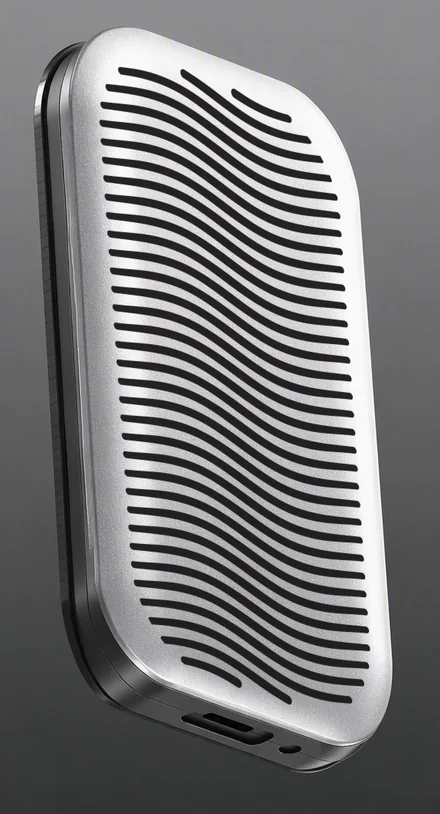
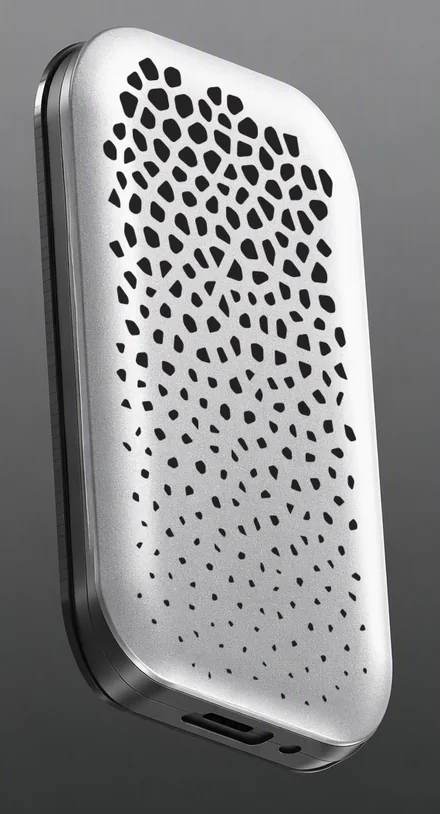
Three directions, each on your own photo: array, flow lines and stone cracks. Say which one and I will turn it into an editable design.
The three mock-ups are the AI putting the pattern back on your photo, so you can compare the look. Dimensions, open area and the manufacturable file always come from the engine.
What you get back
An editable design
One link opens the design in SolidVents, with every spacing, gradient and shape ready to fine-tune by hand.
Straight into your workflow
In an AI modelling workflow the AI exports the STEP itself and hands it to your CAD, or SVG / DXF for laser cutting and drawings. No detour back to the app to export by hand.
How to connect
Both need a SolidVents Pro account. The connector needs no install; a token works in any tool that can run an MCP server.
A · No install
Add it as a connector
For Claude on the web and desktop. You sign in with your SolidVents account; there is no token to copy.
Connectors
Google Drive · GitHub · …
+ Add custom connectorAdd custom connector

An AI app wants to use your SolidVents account
you@example.com
 SolidVents · Connected · 9 tools
Server URL
https://solidvents.com/mcpConnector sign-in has been tested with Claude. Other AI apps that accept a remote MCP server URL with sign-in follow the same steps.
B · For developers
Use an API token
For Claude Code, Claude Desktop, Cursor and your own scripts: anything that can call an MCP server.
API access
Available with Pro.
API access
Copy it now. This token will not be shown again.
Copy$ claude mcp add --transport http solidvents https://solidvents.com/mcp --header "Authorization: Bearer sv_3f9a1c07e4b2…d81e"
→ solidvents-vent.stp
Claude Code: remote server
claude mcp add --transport http solidvents https://solidvents.com/mcp --header "Authorization: Bearer sv_YOUR_TOKEN"Claude Desktop, Cursor and others: local server (the engine runs on your computer)
{
  "mcpServers": {
    "solidvents": {
      "command": "npx",
      "args": ["-y", "solidvents-mcp@latest"],
      "env": { "SOLIDVENTS_TOKEN": "sv_YOUR_TOKEN" }
    }
  }
}Replace sv_YOUR_TOKEN with your own token. Keep it private, like a password.
Questions
Which AI apps can use it?+
Any app that supports the Model Context Protocol (MCP): Claude on the web and desktop, Claude Code, Cursor and others. Apps that take a server URL with sign-in use the connector; the rest use a token.
Do I need Pro?+
Yes. SolidVents MCP and the API are Pro features: every tool, from preview to STEP export, needs a Pro account. The app itself stays free to use.
How close does it get to my reference?+
Looks from the preset library are reproduced exactly from their recipes. For other pictures the AI rebuilds the look from its measurements, which usually gets close; open the design in the app to finish the details.
What can the AI access?+
Only the SolidVents design tools under your account: previews, exports and design links, not your other files or account settings. Download links work for 24 hours; the files and design links are deleted after two days. Each tool call is logged with the tool name, whether it succeeded and how long it took (never your design, pictures or prompts) and kept for 180 days. You can revoke a token or disconnect the connector at any time.
Are there limits?+
Up to 120 exports per hour and 10 tokens per account. Reference pictures up to 6 MB and 16 megapixels; designs up to 200,000 holes. When your Pro plan ends, every tool stops until you renew; the app itself stays free.