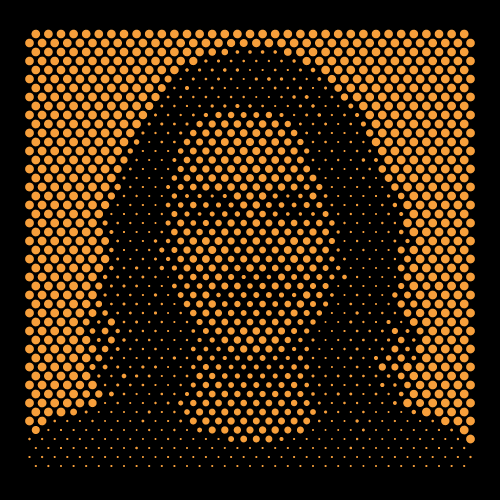
Halftone Dot Portrait Pattern
A portrait rendered purely in circle sizes: the Image-as-Controller feature maps a photo's brightness onto a 7 mm dot grid, turning a face into thousands of precise perforations.
About this pattern
This preset is the flagship demo of SolidVents' Image-as-Controller feature. There is no drawing here, just a dense diamond grid of circles whose individual sizes are driven by the brightness of an uploaded photo. Bright background areas produce large, nearly-touching dots; the dark silhouette of the subject shrinks them to pinpoints, and the portrait emerges from pure dot-size contrast.
Because the mapping is parametric rather than baked, the same preset works with any photo: swap the image and the grid instantly re-renders the new subject. Contrast and Invert controls tune how aggressively luminance translates to dot size, and the settings saved here are balanced for a high-contrast portrait against a light background.
The output is what separates this from a Photoshop halftone filter: every dot is real vector geometry. Export SVG for print, DXF for laser cutting, or STEP (5 mm extrusion pre-set) to machine the portrait into an aluminum or acrylic panel, the classic "photo wall" installation piece.
Pattern parameters
| Array type | Diamond grid (7 × 10 mm pitch) |
| Element shape | Circle |
| Size driver | Image as Controller (photo luminance) |
| Extrusion thickness | 5 mm (STEP export) |
| Canvas | 500 × 500 mm |
Every value above is a live parameter, nothing is baked. Typical uses: Portrait wall art, corporate lobby installations, personalized gifts, event backdrops, laser-cut memorials.
How to use this template
- Open the free Halftone Pattern Generator, which runs in the browser with no install or sign-up.
- Rebuild the look with the parameters listed above, or open Marketplace inside the app and import preset #082 directly (Pro).
- Make it yours: adjust spacing, size, gradients, or swap the element shape, then export as SVG, DXF, or STEP for print, laser cutting, or CAD.
Start designing with this pattern
Free to use, no sign-up, runs in your browser. Every parameter stays editable.
Open the Halftone Pattern Generator · Free